

|
Marine Storekeeper for Windows |
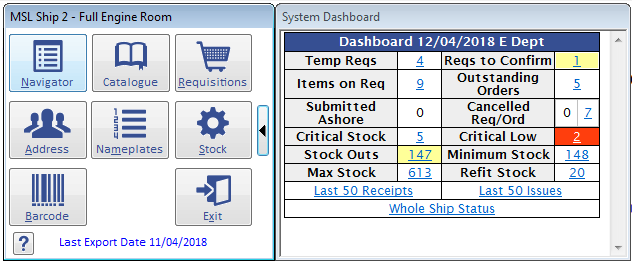
Marine Storekeeper for Windows provides an effective planning and financial management tool to streamline inventory management for all machinery spare parts and consumables.
Requisitions can be generated by browsing the equipment to select items to requisition or automatically.
Automatic requisitions provide the user with a list of all items with stock on hand at or below the set reorder point, taking into account previous requisitions still in the pipeline. Users then have to select which of the proposed items they wish to requisition and have an opportunity to modify the quantity.
Stock issues, receipts and return to stock are quickly and easily accomplished together with adjustments or editing of descriptive information. Stock transactions are written for issues, receipts, return to stock, unit price change, account code change and stock adjustments.
The MPMWin - Marine Planned Maintenance product can be linked to enable crew to consume items when filing PM job completions and identify all spare parts required to facilitate future planned maintenance activities.
The MPSWin - Marine Purchasing System product can also integrate with the MSKWIN so purchase orders can be created from stock items with the nameplate information is copied over to the purchase order. The automatic or manually created requisitions will also be transferred over to the MPSWin to enable the ordering process to be completed there.
A data replication system will transfer database updates ashore to the Office Storekeeper for Windows (OSKWin) product via email, USB stick or automatically via our . This enhances remote technical management by providing timely fleet information at the touch of a button.
Further Information
Information on Support & Maintenance Contracts
MSK - Frequently Asked Questions
If you require more information about this product or wish to receive a free on-line demonstration please contact us using the link below.